
▬▬▬▬▬▬▬▬▬▬▬▬ஜ۩۞۩ஜ▬▬▬▬▬▬▬▬▬▬▬
Get Site Control
▬▬▬▬▬▬▬▬▬▬▬▬ஜ۩۞۩ஜ▬▬▬▬▬▬▬▬▬▬▬▬▬▬▬▬▬▬▬▬▬▬▬ஜ۩۞۩ஜ▬▬▬▬▬▬▬▬▬▬▬
surfing the net i come across endless amounts of new tools & services all the time and it’s very rare that one catches my eye.
When i tried Getsitecontrol.com 6 months ago, it got me hooked!

Getsitecontrol is a powerful tool that combines various programs into one. Imagine something that not only performs specific functions like autoresponder, social sharing but it saves you a bunch of money on monthly subscriptions at the same time.
In my opinion, this makes Getsitecontrol the most value packed tool out there.
Some of the things Getsitecontrol does are:
- Provide detailed widget analysis
- Fully customisable widgets
- Auto responding
- Email liste
- Social sharing
And these are just a few of them. So let’s take a look at each of the tools in more detail so you can see exactly why Getsitecontrol is so powerful.
Getsitecontrol Dashboard
First let’s jump into the dashboard of Getsitecontrol.

This is the dashboard that displays all your activities, notifications and things like that but the greatest thing is that it pulls data from widgets all under one interface.
I’m going to take you through the different steps to costumase a tool from the sidebar so let’s get into it!
The survey widget
==> step 1
First is the appearance step where you can choose the position and the animation of the survey the colors of the background and texts and their fonts. it also provide you with a full screen and a phone preview

==> step 2
This step is where you choose the question of your survey and the button text

==> step 3
Here we can setup the thank you page as you see. we can even redirect the visitor to another page after completing the survey
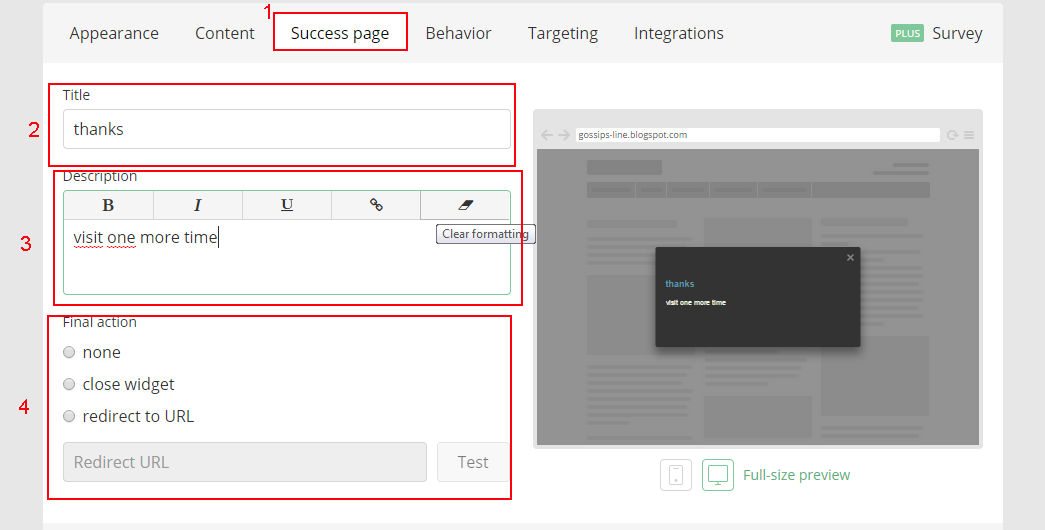
==> step 4
I think that this step is the most important step in setting up your widget . in this step you can setup when you start displaying this survey by date and by behavior of the visitor and the frequency of displaying this survey and when it stops

==> step 5
Targeting your audience is also so easy with this tool . It allow us to show this survey to only specific targets that are sorted by many factors

==> step 6
This is the final step where you can enable the auto responder or use third party integration

Wrapping it up
There’s really so many tools in this suite that you can use to manage your websites, your blog network, find new clients, increase your social media sharing, generate reports and so much more!
Getsitecontrol.com saves me so much money since it can perform the functions of various different services which can cost anywhere from $15 a month to $100 a month each.
For a monthly subscription of $9, it’s a huge money saver making it an essential tool for anyone who is serious about improving his website!
Resources In The Tutorial
Getsitecontrol.com – ( Best Tool ever )


